
Yuma product update: AI automation in Ableton Live
Version 2.6 lets Yuma write clip automation: filter sweeps, volume rides, panning, and other parameter moves that play back inside Ableton Live.
Last updated June 18, 2026

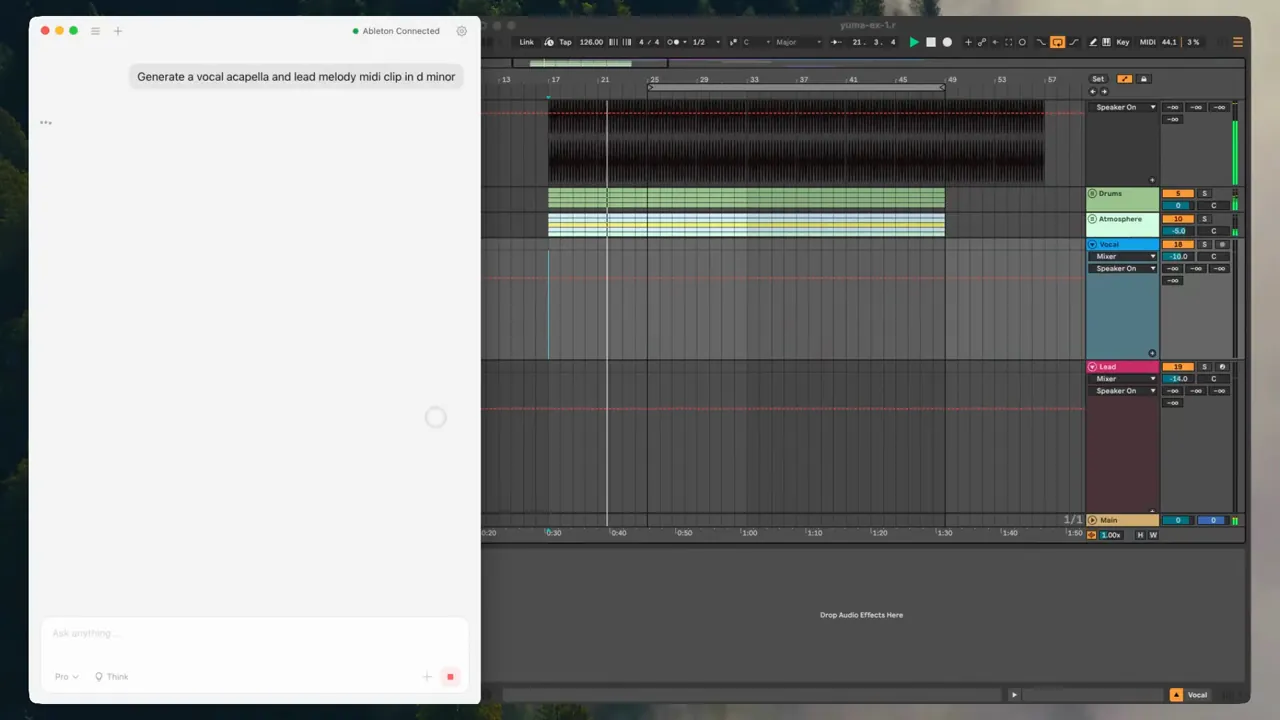
Yuma can now write automation in Ableton Live. In version 2.6, you can ask for filter sweeps, volume rides, panning, and other parameter moves in plain language, and Yuma draws the automation into your clips.
This is a big step for the Ableton integration. Notes give you a part. Automation gives the part motion.
It is also part of the larger reason AbletonGPT became Yuma. The product is moving from "AI can make a music idea" toward "AI can help edit the session itself." MIDI, audio, Arrangement placement, Session clips, native Ableton objects, and automation all point in the same direction: the assistant should help inside the DAW, then leave you with normal Ableton material you can keep shaping.
What's new in Yuma 2.6
Version 2.6 adds AI automation writing for Ableton Live.
That means you can describe a movement in musical language and Yuma can write the matching automation envelope into the clip. The result plays back in Ableton, appears in Ableton's automation lanes, and remains editable by hand.
The update is especially useful for:
- Filter movement: opening a low-pass filter into a chorus or drop.
- Volume rides: making a vocal, pad, lead, or texture sit in the section.
- Panning: moving percussion, ear candy, or effects around the stereo field.
- Device parameters: changing a sound over time instead of leaving it static.
- Transitions: making the last two, four, or eight bars of a section build with intention.
Automation writing joins the rest of Yuma's Ableton control surface: reading the open set, writing MIDI clips, controlling playback, placing generated audio into Arrangement, building drum kit assets, and working with the session through the Yuma Remote Script.
What automation support means
Automation is how a sound changes over time: a low-pass filter opening before the drop, a vocal riding up into the chorus, a pan move that makes a percussion loop feel wider.
Yuma writes those moves as real Ableton automation envelopes. The result plays back inside Live and can be edited by hand like automation you drew yourself.
That last part matters. Yuma should leave you with a normal Ableton project after it does the boring drawing work. You still have the same Ableton control you already had.
Why automation belongs in an AI Ableton integration
Generating notes is useful. It is also only part of producing.
Most of the feeling in an Ableton project comes from movement: the filter opens, the reverb send blooms, the bass ducks, the vocal pushes forward, the percussion gets wider, the pad fades before the next section. Producers spend a lot of time making these moves by hand because they are what separate a loop from an arrangement.
Yuma's job is not to remove that taste. The point is to make the first pass faster.
You can ask for a shape:
Make the pad open up slowly through the pre-chorus, then pull it back before the hook.
Yuma can create the automation move. You can listen, adjust the curve, change the endpoint, or ask for another pass.
Ask for movement in plain language
You can write:
Sweep the filter open over the last four bars, then ride the vocal up into the chorus.
Yuma reads the session context, finds the relevant clip and parameter, and writes the envelope.
You can keep the result, edit the points, or ask Yuma for another pass. It lands in Ableton as normal automation, so you keep control.
Session View and Arrangement View
Automation behaves differently depending on how you work in Ableton.
In Session View, automation can help a clip feel performed instead of static. A drum clip can get a subtle pan movement. A bass clip can open its filter every time the scene launches. A chord clip can swell into the next phrase.
In Arrangement View, automation becomes part of the song timeline. This is where filter sweeps, long transitions, risers, and volume rides become especially useful. Yuma can help create the movement, and you can still refine the arrangement exactly where the change happens.
Yuma's broader Ableton control also supports Arrangement-focused audio placement. Generated vocals, samples, and effects can become normal WAV files and can be inserted onto Arrangement audio tracks. Automation gives those placed sounds a way to move after they land.
Useful moves to try
- Filter sweeps: build tension before a drop or transition.
- Volume rides: bring a vocal, lead, or texture forward at the right moment.
- Panning: add movement without changing the notes.
- Device parameters: move knobs over time instead of leaving a sound static.
The best prompts describe the musical shape, not only the parameter:
Make the pad open up slowly through the pre-chorus.
That gives Yuma room to choose the automation move that fits the section.
Here are a few more useful prompt patterns:
| Goal | Prompt idea | Where it helps |
|---|---|---|
| Build into a chorus | "Open the filter over the last four bars before the chorus." | Arrangement transitions |
| Make a loop breathe | "Add subtle volume movement so this pad feels less static." | Session clips and sustained parts |
| Create stereo motion | "Pan the percussion slightly left and right across the phrase." | Drum loops and ear candy |
| Clean up a vocal moment | "Ride the vocal up into the hook, then settle it back down." | Arrangement vocals |
| Add tension | "Increase the effect send through the breakdown." | Builds and breakdowns |
How it fits with native Ableton control
Yuma is strongest when it writes things Ableton already understands.
Automation is a native Ableton concept. It is not an image of a curve or a separate Yuma-only effect. It is an envelope inside the Ableton project. That is why this update matters for the product: it gets Yuma closer to complete control over the musical surface of the set.
AbletonGPT proved that producers wanted a chat layer connected to Live. Yuma is the next version of that idea. The assistant can help with Session clips, Arrangement edits, generated audio, MIDI, native device movement, and automation while keeping the result inside the user's own project.
More reliability in the same release
Version 2.6 also included a reliability pass around startup and file state. The app now repairs saved data on launch and falls back to a recovery screen if something looks wrong.
On Mac, Yuma now ships as a single universal build that runs natively on Apple Silicon and Intel. MIDI chord generation also improved, so re-rolling a progression gives you different voicings instead of the same idea again.
Those changes are less visible than automation, but they make the app feel more dependable. If the AI layer is going to control a real Ableton session, startup, saved state, and local files have to behave cleanly.
Availability
Automation writing is available in Yuma 2.6 and newer. If you're updating from an older AbletonGPT install, open Yuma, run the Remote Script installer, then fully restart Ableton and choose "Yuma" from the Control Surface dropdown.
For now, treat automation as a fast first pass. It is meant to help you get movement into the session quickly, then revise in Ableton with your ears. That workflow is the whole point: Yuma does the tedious part, and the producer keeps taste and final control.
Download or update Yuma and read the full changelog.
Frequently asked questions
- What kinds of automation can Yuma write?
- Yuma can write filter sweeps, volume rides, panning, and other parameter moves as automation envelopes inside Ableton clips.
- Do I have to draw the automation myself?
- No. You describe the move in plain language, for example sweep the filter open into the drop, and Yuma writes the envelope into the clip. You can edit it by hand in Ableton afterward.
- Does Yuma write automation in Session and Arrangement view?
- Yuma writes MIDI and automation into clips and can place audio on the Arrangement timeline. Session-view audio clip-slot insertion is limited by Ableton's API, so generated audio placement is Arrangement-focused today.